Bookkeeping for Amazon sellers · US, Canada, Mexico
Connect Amazon. Close the month.
Settlements become balanced journal entries, payouts tie to your bank, and cost of goods posts itself after you post the sale.


- Fig. 0.1 A settlement opens with its raw report rows.
- Fig. 0.2 It composes into one entry. Debits equal credits.
- Fig. 0.3 You post the sale. Its cost of goods follows by rule.
- Fig. 0.4 The payout is matched to the deposit that received it.
Watch a settlement become a balanced entry
Sample data from the same engine you’ll run.
Fig. 1
Compose it yourself
A sample Amazon settlement, row by row, beside the journal entry it becomes. Step through it, or select any entry line to see the settlement rows it came from. Press Escape to clear.
- Salesdone
- Feesdone
- Refundsdone
- Advertising linedone
- Reservedone
- Net payoutdone
- You post itdone
- Cost of goods posts by rule after your saledone
- Matched to its bank depositdone
Settlement report
Amazon.com · 2026-10-15 to 2026-10-28
Sales
- Product salesSAMPLE-SKU-A × 832,780.50
- Product salesSAMPLE-SKU-A × 2899,826.00
- Product salesSAMPLE-SKU-B × 2285,814.00
Fees
- Referral feeSAMPLE-SKU-A × 289(1,473.90)
- Referral feeSAMPLE-SKU-A × 83(417.08)
- FBA fulfilment feeSAMPLE-SKU-A × 289(1,572.16)
- FBA fulfilment feeSAMPLE-SKU-A × 83(451.52)
- Referral feeSAMPLE-SKU-B × 228(872.10)
- FBA fulfilment feeSAMPLE-SKU-B × 228(1,194.72)
Refunds
- Refunded salesSAMPLE-SKU-A × 12(408.00)
- Refunded salesSAMPLE-SKU-B × 8(204.00)
Advertising line
- Cost of advertising (sponsored ads)(1,150.00)
Reserve
- Reserve held back(1,500.00)
Journal entry
Posted- 4030Sales — Amazon USCredit 18,420.50
- 5060Amazon referral feesDebit 2,763.08
- 5040Amazon FBA fulfillment feesDebit 3,218.40
- 4200Returns & refundsDebit 612.00
- 6010Advertising — Amazon PPCDebit 1,150.00
- 1180Amazon — reserved balance / split-month rolloverDebit 1,500.00
- 1170Amazon — settlement clearingDebit 9,177.02
You post it
A person reviews the sales entry and posts it. A sale never posts on its own.
PostedEntry JE-2026-000004
Cost of goods posts by rule after your sale
Once your sale is posted, the database posts its cost of goods by rule. Nobody clicks, and no model is involved.
Units sold, net of refunds, times the unit cost you entered for each SKU:
- SAMPLE-SKU-A: 360 units × 12.50 = 4,500.00
- SAMPLE-SKU-B: 220 units × 9.00 = 1,980.00
- 5010Product costDebit 6,480.00
- 1310Inventory — finished goodsCredit 6,480.00
Posted by rule, not by a person
Matched to its bank deposit
- Bank line
- Amazon payout sample (Wise)
- Amount
- 9,177.02
- Reference
- sample-amazon-payout-sample
- Deposit date
- 2026-10-31
- 1110Bank — operating (USD)Debit 9,177.02
- 1170Amazon — settlement clearingCredit 9,177.02
Matched
- Debits
- 18,420.50
- Credits
- 18,420.50
Debits 18,420.50, credits 18,420.50, balanced
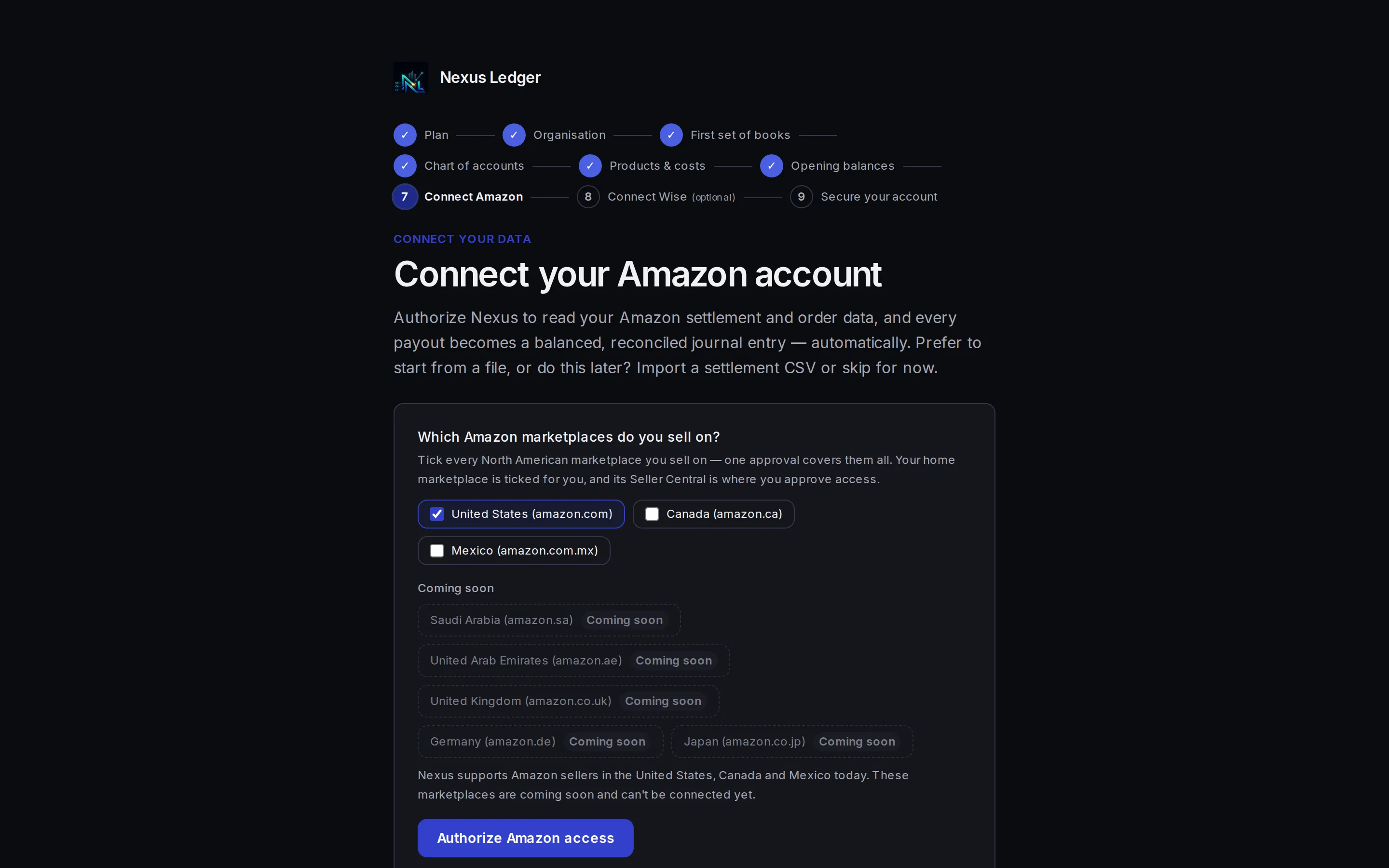
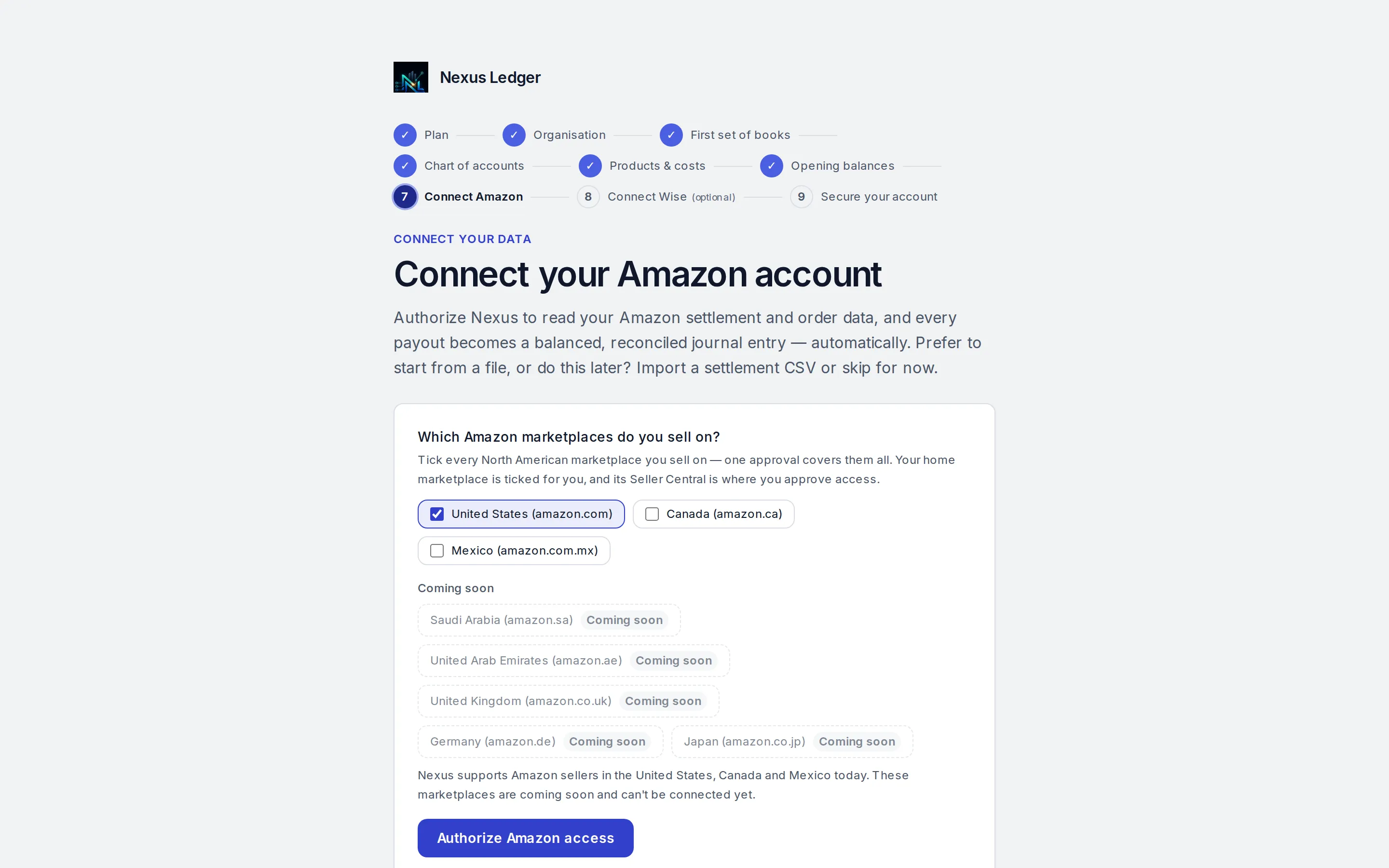
Connect
Connect read-only. Settlements arrive on their own.
Authorize once in Amazon Seller Central, read-only. Each settlement arrives by itself and is composed into a balanced draft entry.
- Sales, refunds, fees, reserves and advertising arrive as settlement lines
- No report exports and no copy-paste
Reconcile
Every payout tied to the bank
Connect Wise for a daily-synced feed (or press Sync now), or upload a CSV or OFX statement from any other bank. Each Amazon payout is matched to the deposit that actually arrived.
- One click approves a settlement and its bank match
- A payout and its deposit are shown as a pair
- CSV or OFX upload works for any bank
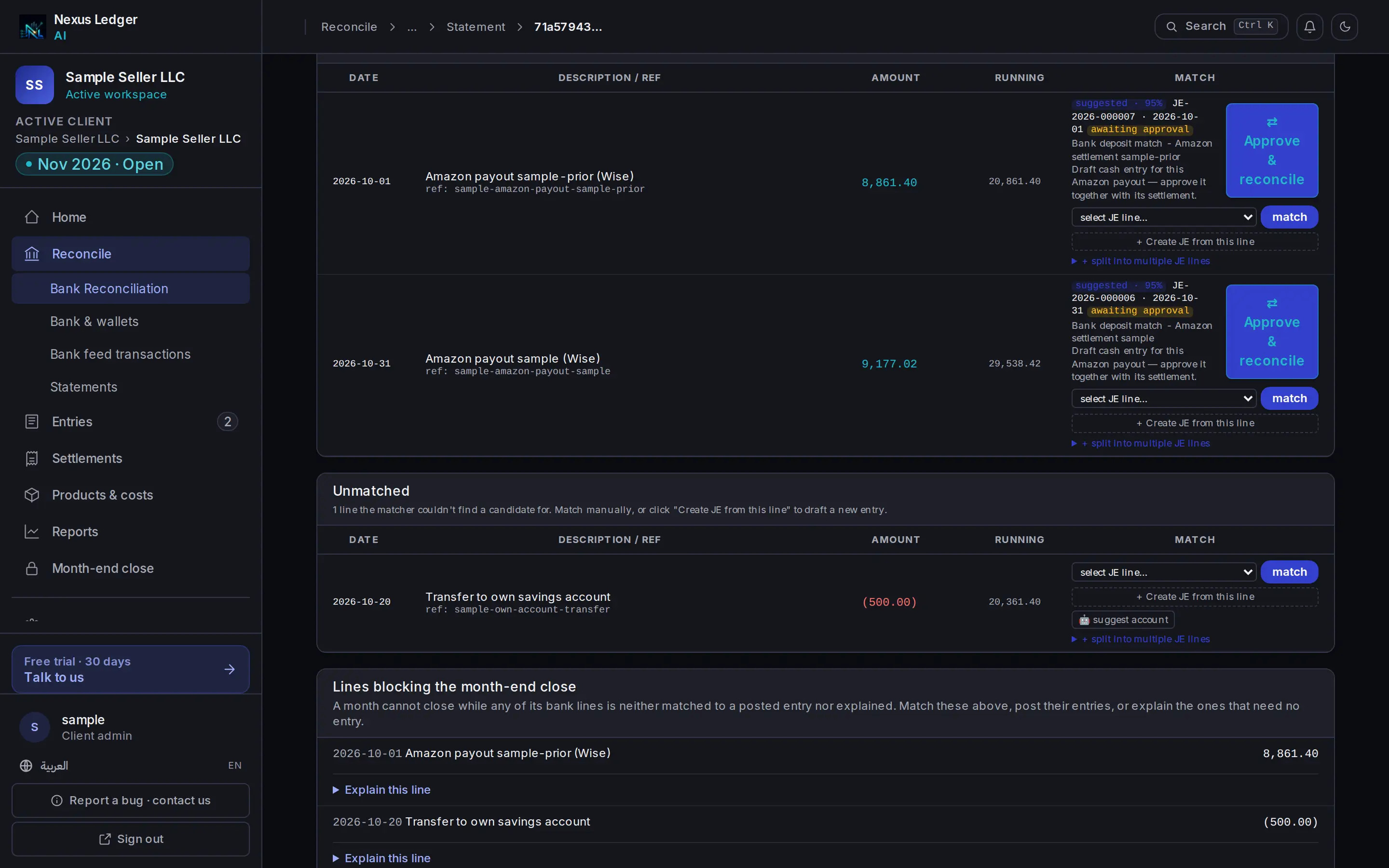
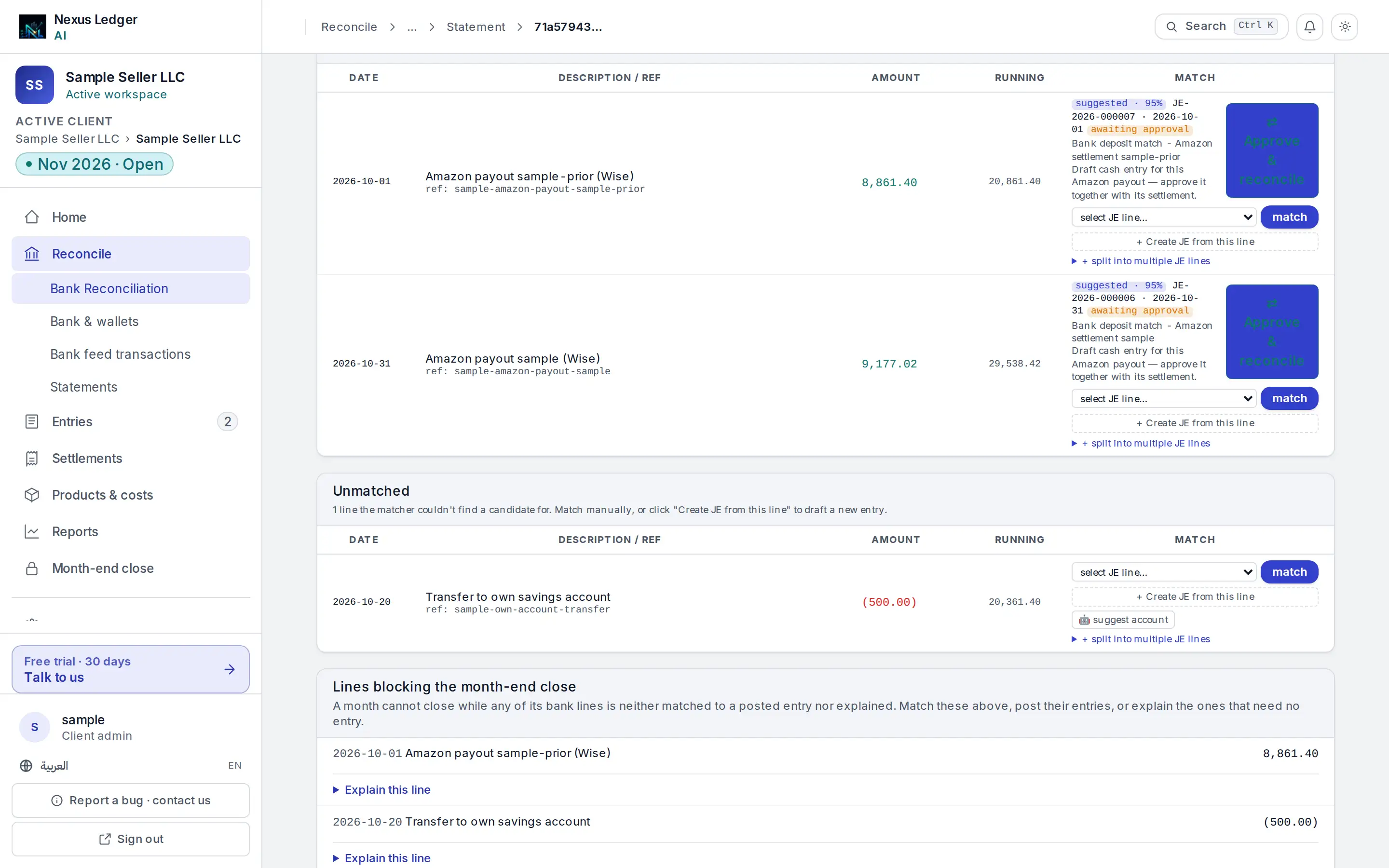
- Payout and deposit, paired for your approval
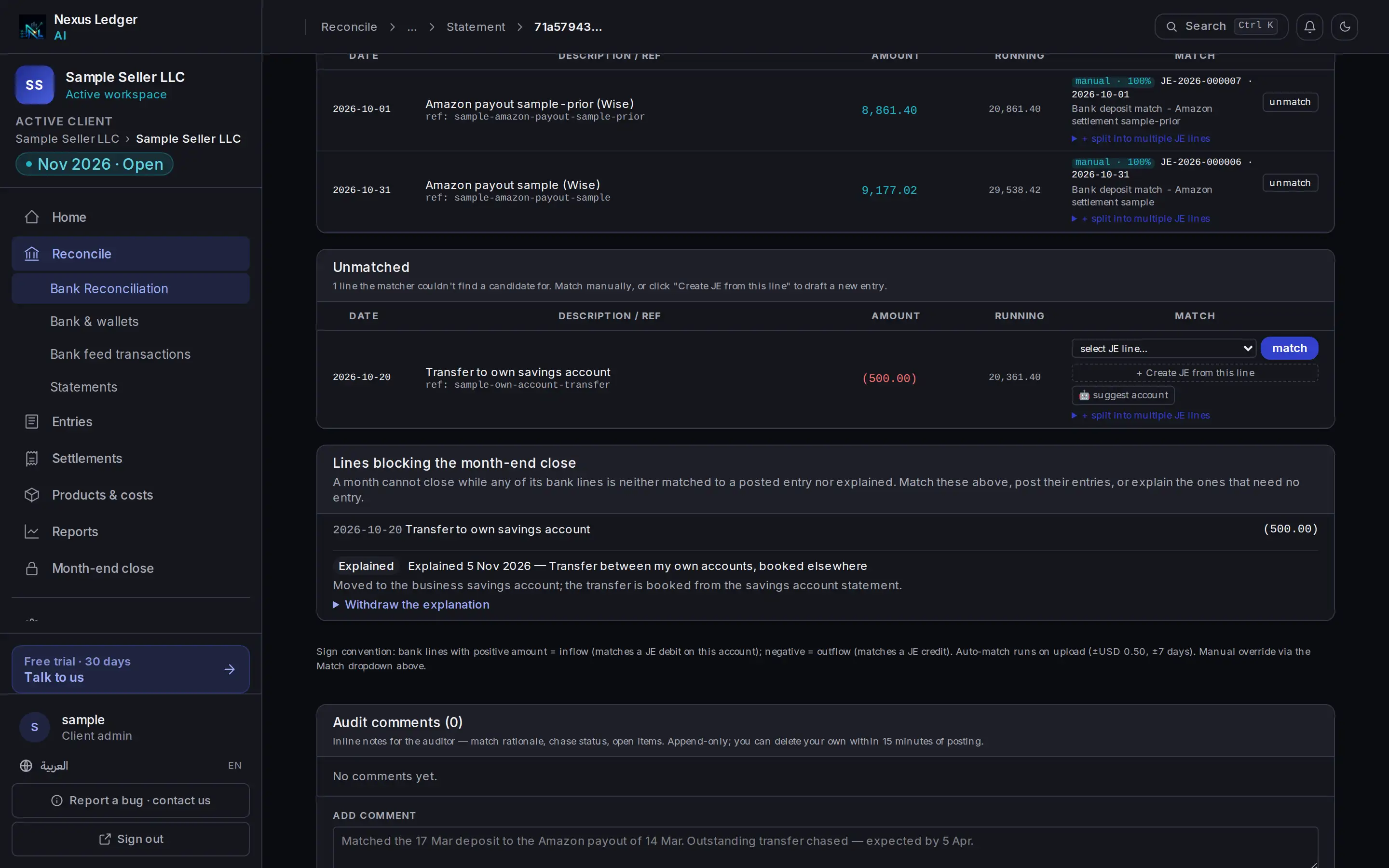
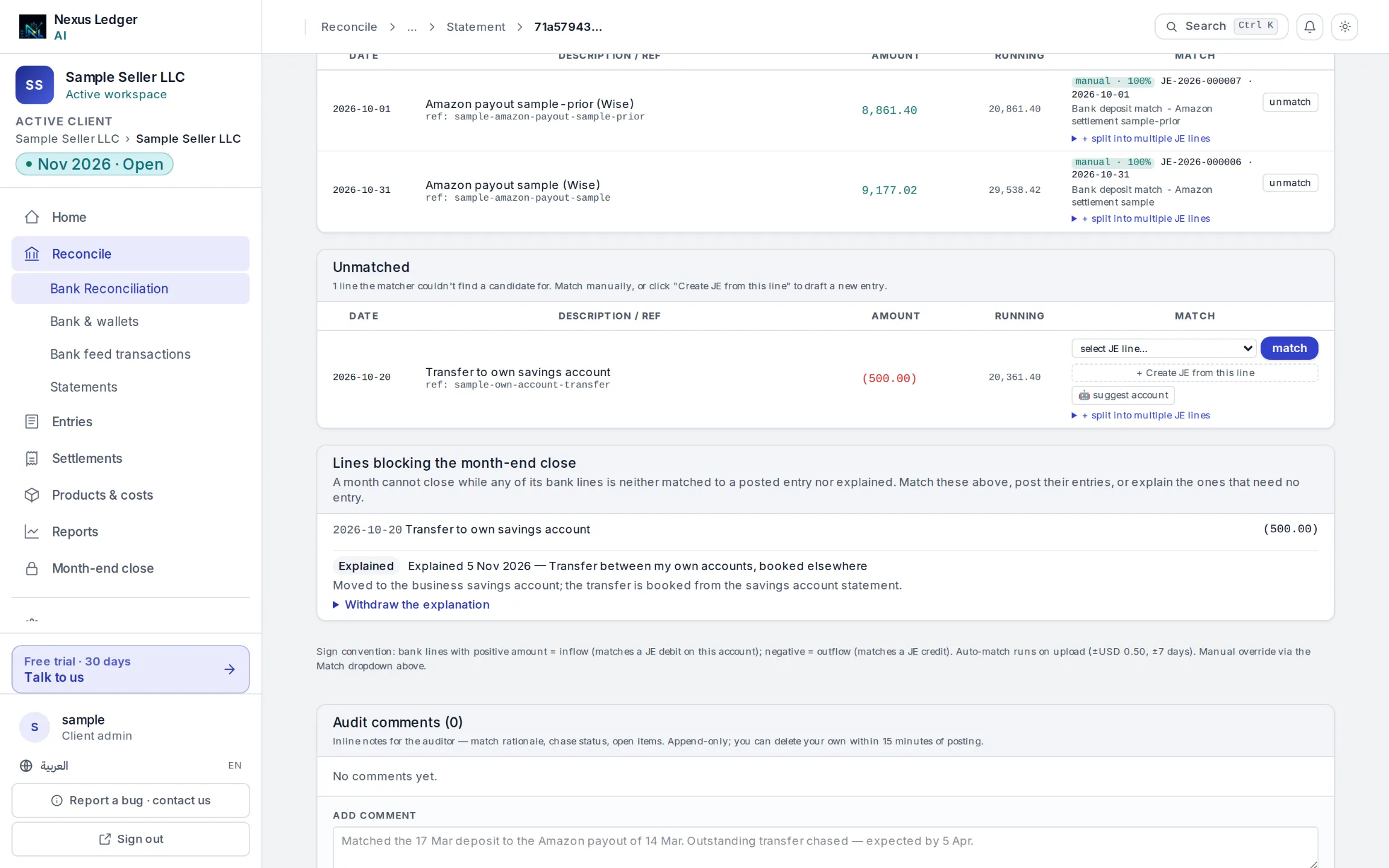
- An explained line
Close
Close a month that ties
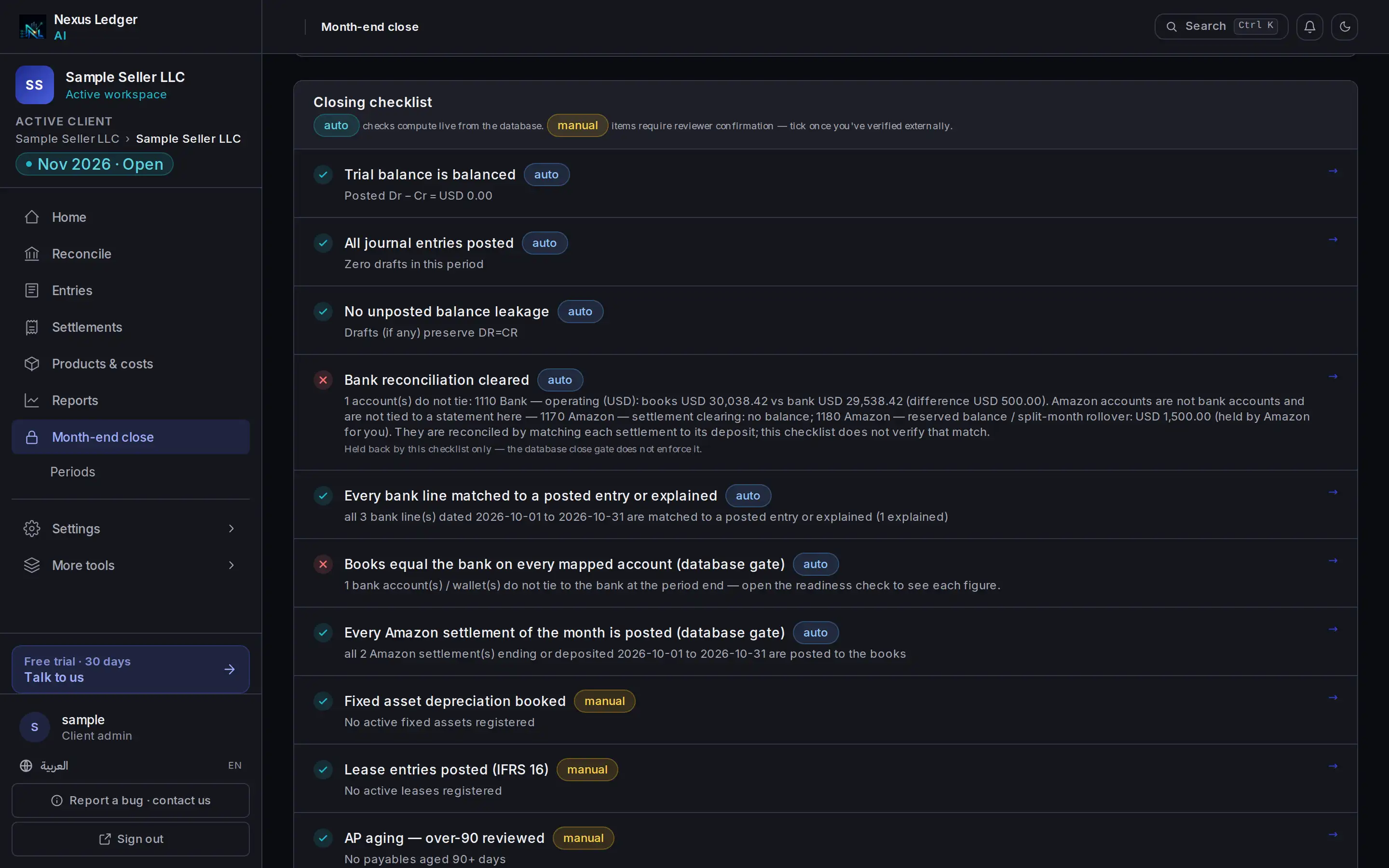
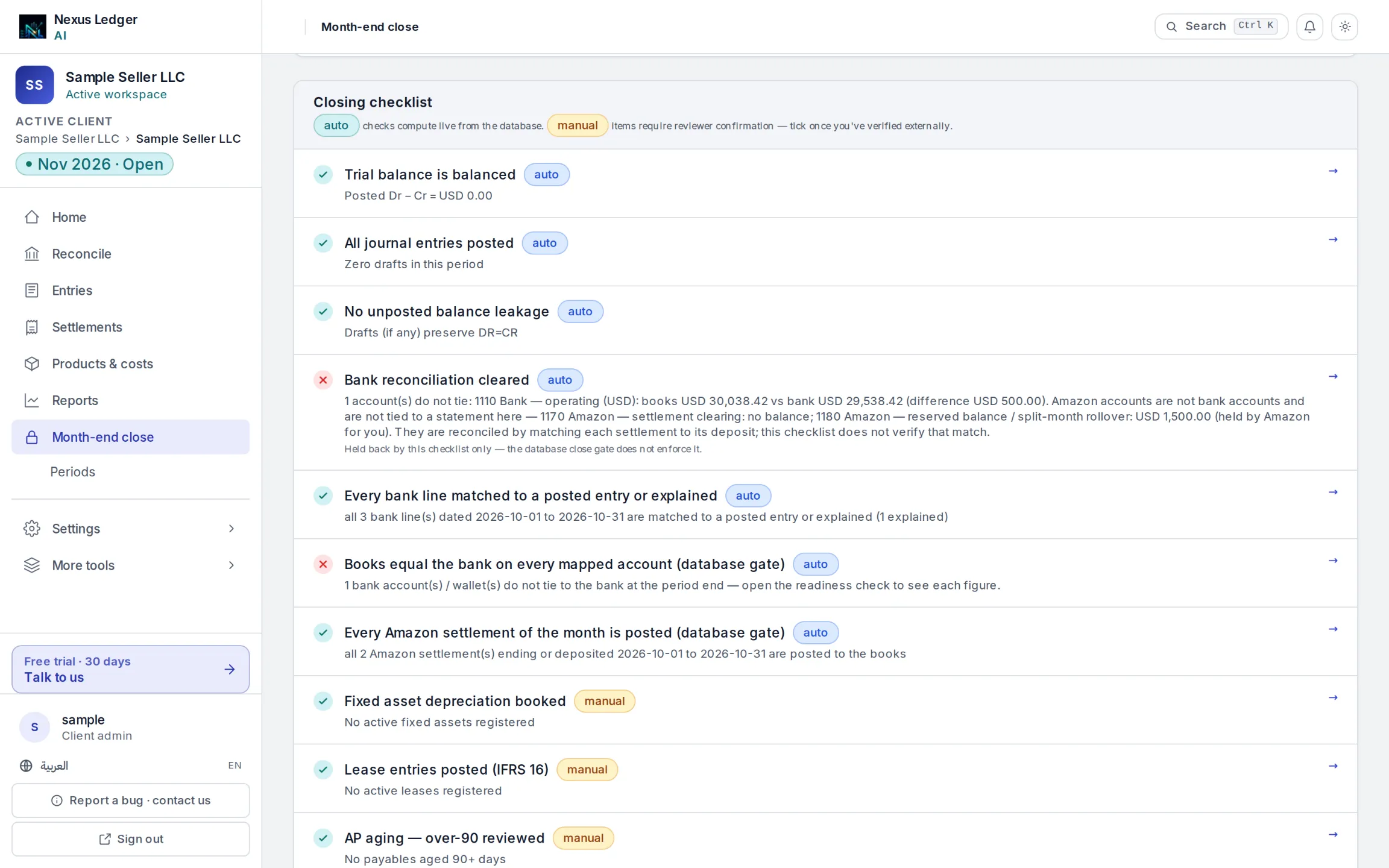
Add the costs Amazon never sees, check that the trial balance ties out, then close. A closed month refuses new entries unless you mark one as an adjustment.
- See every unmatched bank line before you close
- Each trial-balance row drills down to its entry and its source
AI, with limits
Rules keep your books. AI does the busywork. Nothing posts on AI’s say-so.
Settlements, fees, refunds, reserves, advertising lines and cost of goods are composed by a rules engine, and the database refuses any entry where debits do not equal credits. AI only reads, suggests and drafts.
- Ask your books in plain English about profit, fees, open settlements or the close. Answers come from your posted entries, and net profit names the settlements still unposted beside the number.Seller Growth and up
- Cross-check a drafted entry against its document, line by line, before you approve it.Seller Growth and up
- Get a suggested account for a bank line no rule matches, and a flag on a posted entry that looks unusual against comparable history. Nothing is blocked or changed.
- Read a plain-language summary of what is blocking month-end, above the checklist.Seller Growth and up
- Ask why one account moved this period.Seller Pro and up
Your data
Settlements, bank lines and receipts
AI reads, suggests, drafts
Answers, extracted fields and suggestions
The database checks
Debits equal credits and the period is open
A draft entry
Nothing is posted yet
You post
Your books change only when you post
The one automatic post
Cost of goods posts by a fixed rule, not by AI, and only after you have posted its sale.
Both books at once
One entry, two books
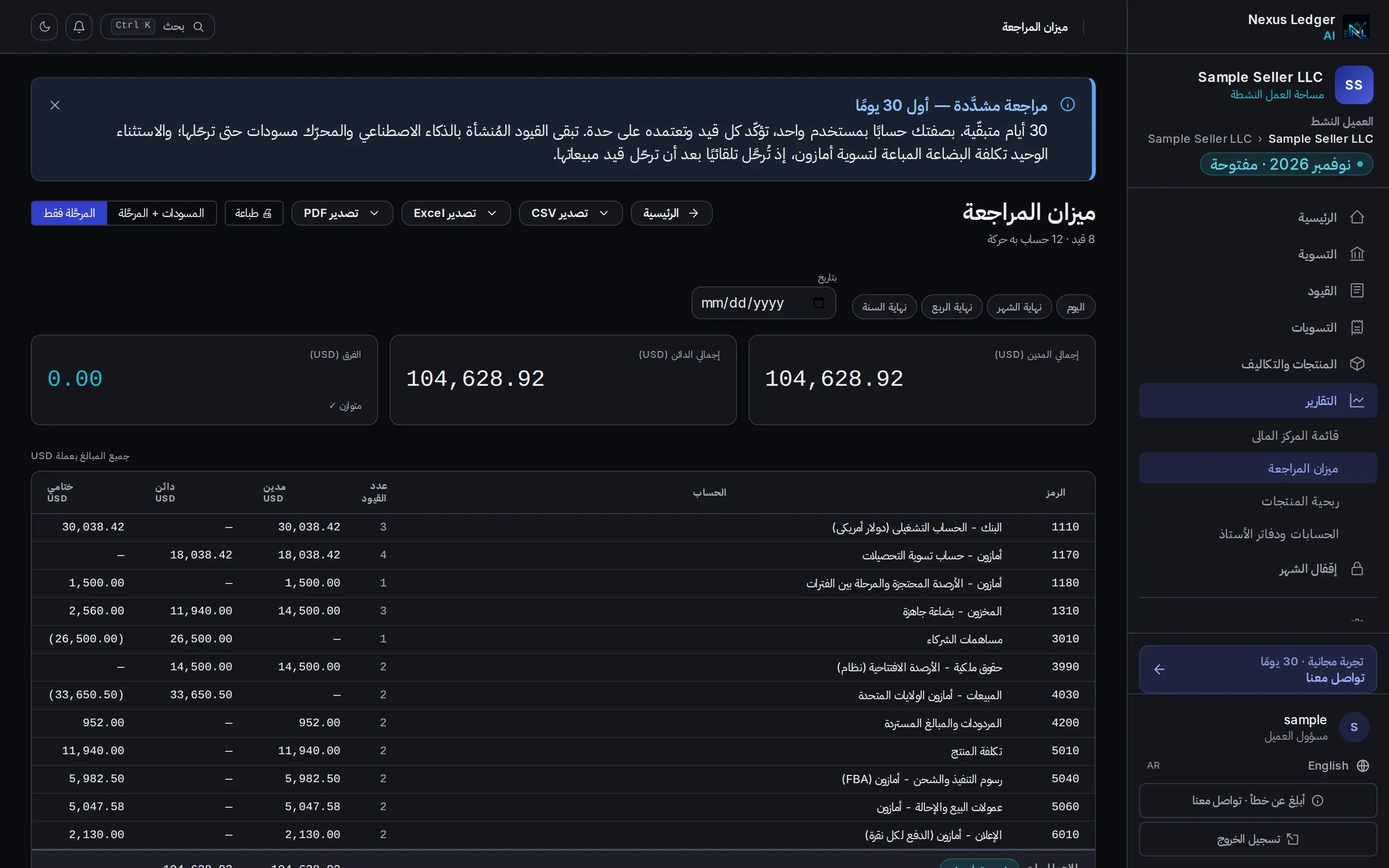
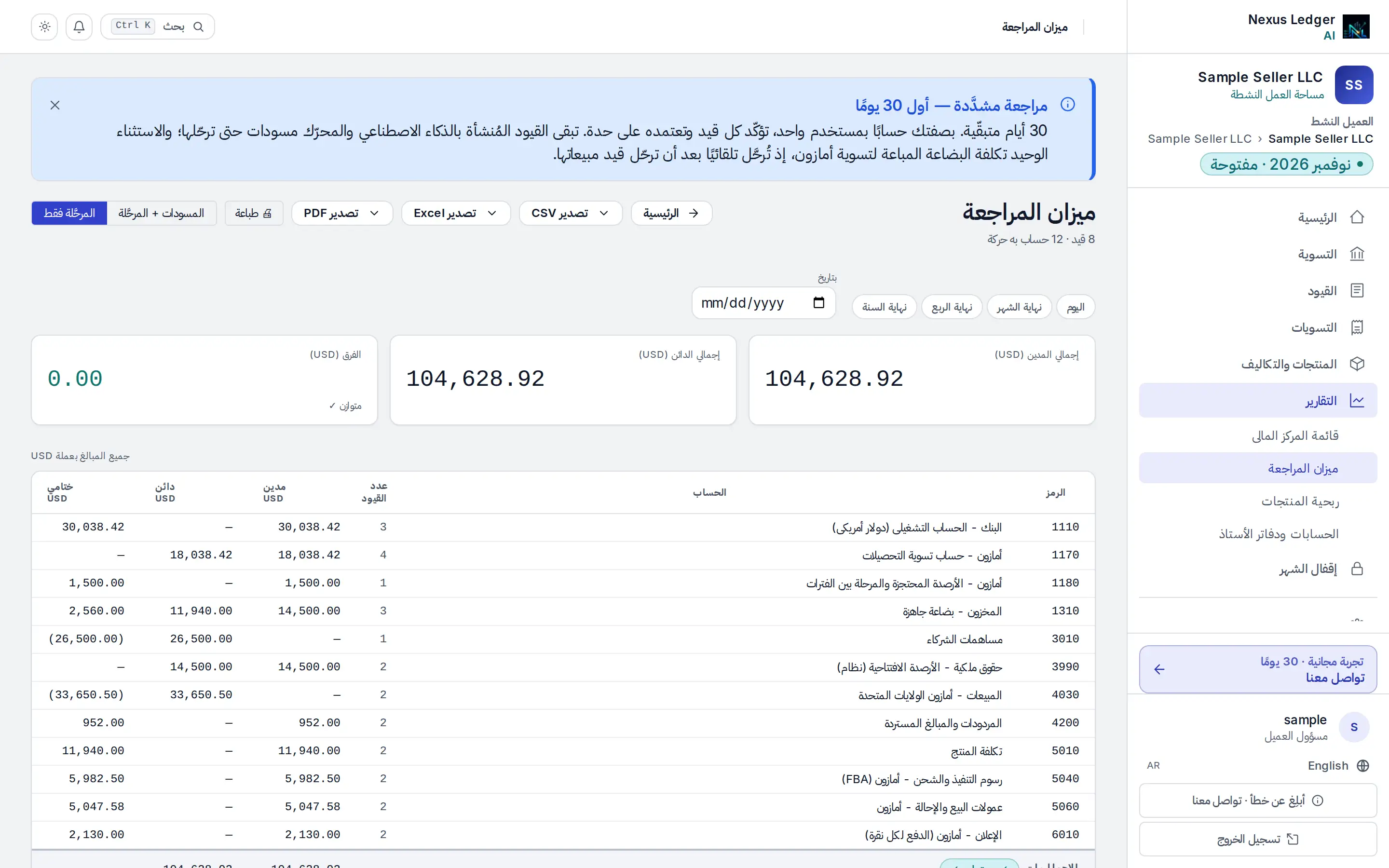
Every account and every entry carries both an English and an Arabic name. Arabic account names are on by default for GCC sellers, and one setting for everyone else. This is one composed entry drawn twice from the same recording, with no second dataset.
Recorded from the real engine on sample data
Select a line to see the same line in the other book.
English
Journal entry
Settlement period 15 Oct 2026 – 28 Oct 2026
- 4030Sales — Amazon USCredit 18,420.50
- 5060Amazon referral feesDebit 2,763.08
- 5040Amazon FBA fulfillment feesDebit 3,218.40
- 4200Returns & refundsDebit 612.00
- 6010Advertising — Amazon PPCDebit 1,150.00
- 1180Amazon — reserved balance / split-month rolloverDebit 1,500.00
- 1170Amazon — settlement clearingDebit 9,177.02
- Debits
- 18,420.50
- Credits
- 18,420.50
Balanced · Difference 0.00
العربية
قيد يومية
فترة التسوية 15 أكتوبر 2026 – 28 أكتوبر 2026
- 4030المبيعات - أمازون الولايات المتحدةدائن 18,420.50
- 5060عمولات البيع والإحالة - أمازونمدين 2,763.08
- 5040رسوم التنفيذ والشحن - أمازون (FBA)مدين 3,218.40
- 4200المردودات والمبالغ المستردةمدين 612.00
- 6010الإعلان - أمازون (الدفع لكل نقرة)مدين 1,150.00
- 1180أمازون - الأرصدة المحتجزة والمرحلة بين الفتراتمدين 1,500.00
- 1170أمازون - حساب تسوية التحصيلاتمدين 9,177.02
- المدين
- 18,420.50
- الدائن
- 18,420.50
متوازن · الفرق 0.00
Fig. 4.1 · English
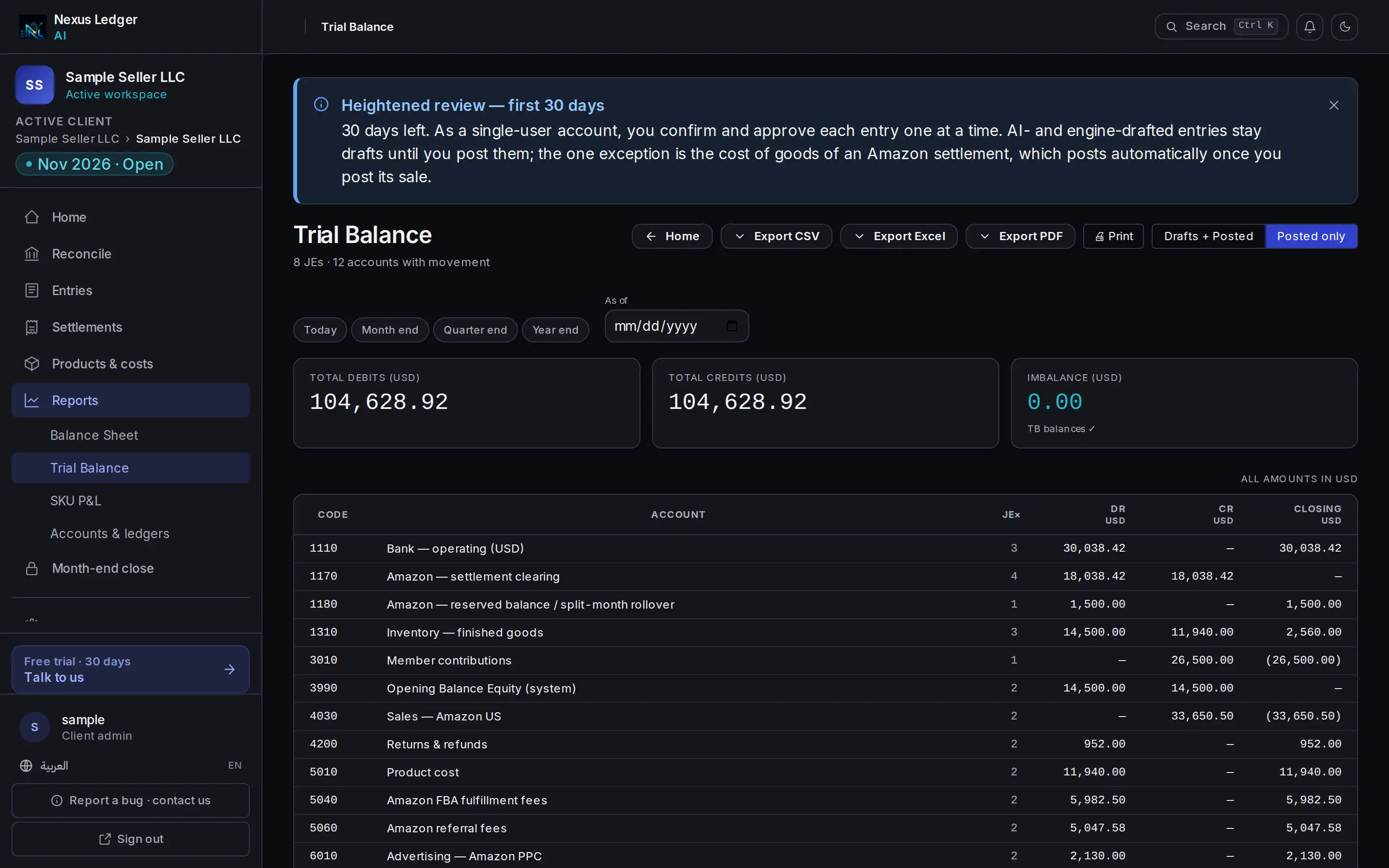
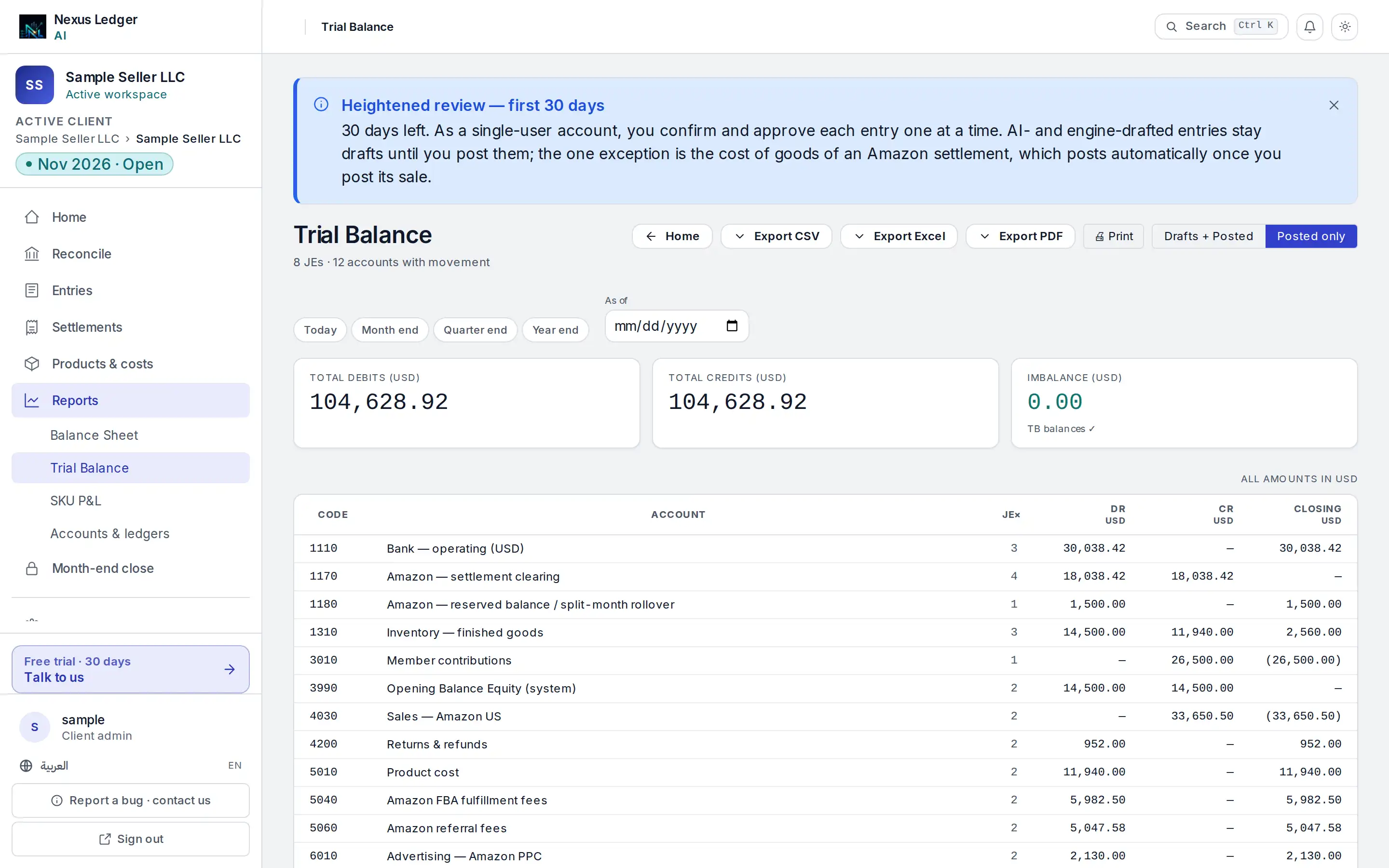
Fig. 4.2 · Arabic
Evidence you can open
Check it without taking our word for it
Open the files the engine produced on the sample tenant: the settlement above, an earlier settlement and the opening balances. Add the columns up yourself, then read how each control is enforced.
- Sample data
The sample settlement
The raw settlement lines the sandbox starts from, as plain text.
- Sample data
The composed entry
Every line of the balanced entry, as a CSV you can add up yourself.
- Sample data
The trial balance
Closing balance per account from the same run: the settlement above, an earlier settlement and the opening balances, where debits equal credits. The trial balance screen also shows each period’s movement, so its totals read differently from this file’s closing balances.
The control register
Each control we state, where it is enforced and how to check it.
Pricing
Simple pricing, books included
Sized by monthly Amazon orders. Every plan includes settlements as balanced journal entries, bank reconciliation and the month-end close.
All prices in USD.
Seller Starter
New or small Amazon seller keeping their own books.
up to 200 Amazon orders / mo
Save 20% billed yearly
- Amazon settlement sync → balanced journal entries
- Cost of goods from your SKU unit cost
- Bank reconciliation — Wise feed synced daily, or CSV / OFX upload
- Manual entries with supporting documents
- Trial balance + month-end close
Seller Growth
A growing seller who wants to ask questions of their books across more orders.
up to 1,000 Amazon orders / mo
Save 8% billed yearly
- Everything in Starter, plus:
- Ask your books in plain English
- Cross-check a drafted entry against its document
- A plain-language close summary
Seller Pro
A team that needs more than one user and an audit log.
up to 5,000 Amazon orders / mo
Save 7% billed yearly
- Everything in Growth, plus:
- Additional users · dual control binds from the second user · audit-log viewer
- Ask why one account moved this period
Order bands, billing periods and the full feature comparison are on the pricing page. See full pricing
Questions
The things sellers actually ask.
Which Amazon sellers can use it today?
Nexus Ledger is built for Amazon sellers in the United States, Canada and Mexico, and one North America Amazon account covers all three. Other marketplaces are coming soon, and we’ll say so here when they open.
Does anything post automatically?
Only cost of goods, and by a fixed rule, not AI. When you post a settlement’s sale, its cost of goods posts itself in the same period: units sold, net of refunds, × the unit cost you set per SKU. It is on by default for a new book and you can switch it off in Settings. Each settlement and bank match waits for your one click, and entries you add post when you approve them.
Which banks can I reconcile?
Wise connects as a feed that syncs daily, and you can press Sync now any time. For any other bank, upload a CSV or OFX statement exported from it. Either way, each Amazon payout is matched to the deposit that arrived.
Can I see advertising spend by SKU?
Advertising spend arrives as a settlement line. Per-SKU ad attribution isn’t available, because Amazon’s advertising data is not part of the finance access we use.
What about costs that aren’t on the settlement?
Add them as entries — software, freight, samples, professional fees — with the receipt or invoice attached as a PDF. They post when you approve them and drill back to their document.
Do you read my buyers’ personal information?
No. The Amazon connection has Finance & Accounting access only and requests no buyer data. It reads settlements, fees, refunds, reserves and reimbursements: the figures a bookkeeper needs and nothing more.
Can an entry be posted out of balance?
No. A database trigger refuses any entry where debits do not equal credits.
What happens to a posted entry that turns out wrong?
It is never edited or deleted. A correction is a new reversal entry linked to the original and visibly marked as one. Within 24 hours of posting, before anything downstream has used it, you can undo your own post.
Where is my data stored?
Your books are stored in an EU region. Uploaded documents are kept in private storage, never in a public bucket.
Connect Amazon. Close the month.
Start a free 30-day pilot, connect Amazon and your bank, and watch your last settlement become a balanced journal entry.